Smart clipboard history
Search, filter, pin, and reuse copied text, links, images, files, colors, JSON, Markdown, phone numbers, emails, and addresses.
 Smart Copy Clipboard
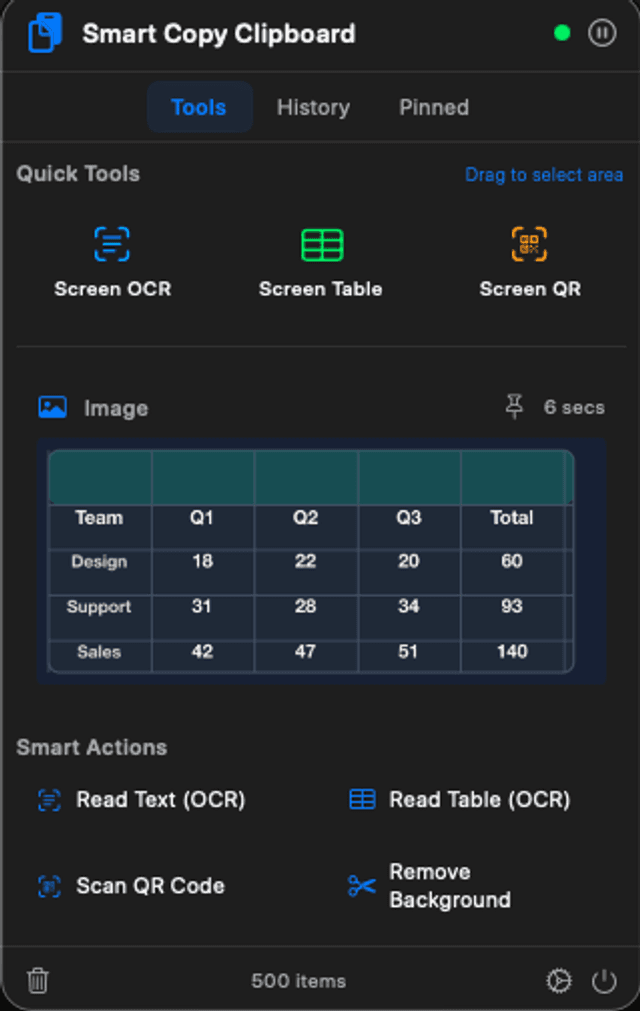
Smart Copy Clipboard turns everything you copy on Mac into something useful: searchable history, rich previews, text and table OCR, QR scanning, background removal, translation, and file actions from the menu bar.
30-day free trial. One-time lifetime purchase available in the app.
What it does
Search, filter, pin, and reuse copied text, links, images, files, colors, JSON, Markdown, phone numbers, emails, and addresses.
See link previews, image thumbnails, PDF and file thumbnails, file paths, and useful context before you paste.
Extract text, capture tables from screenshots, scan QR and barcodes, and remove image backgrounds using native Apple frameworks.
Translate copied text with Apple on-device translation when available, or fall back to Google Translate when you need broader language coverage.
Select any region of your display for text OCR, table OCR, or QR scanning without saving screenshots or switching apps.
A lightweight menu bar workflow with launch at login, notification controls, local history settings, and a one-time lifetime purchase.
New in the smart workflow
Links and files
Images
Translation
Built for repeated use